My previous entry way
back on Aug.18 talked about the Nike+ipod widget I had picked up along
with a first gen Nano. I figure it is time for an update. I still use it
5 or 6 times a week and I just logged my 100th run. There have been a
few more actually, but I have had the odd Nano crash/corruption on me
before I had a chance to upload a run.
Despite those occasional technical glitches, I still really like using
it. I have been eyeing the Garmin Forerunner 305, but I
actually like listening to music or a podcast as I run and it seems a
bit much to strap a GPS to my wrist and also carry an mp3 player. Plus
the thing costs $300+ vs. the $27 the Nike+ipod gadget costs, assuming
you already have a Nano.
My 100th run looked like this:
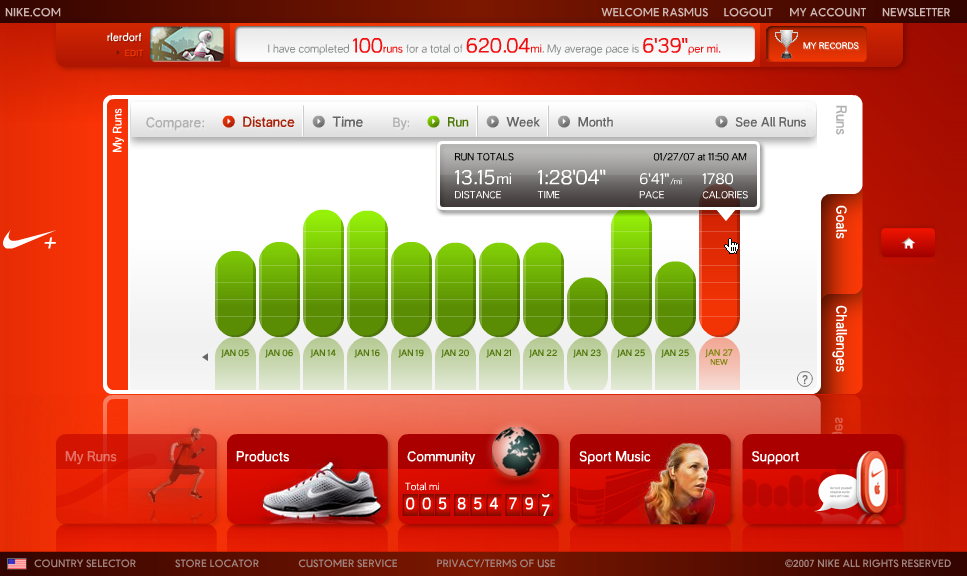
620 miles later and some 80,000 calories burned I have gone from being a 205lb fat slow geek to a 175lb slow geek. Not entirely true, I lost about 10lb before I started running more seriously, so the Aug.18 to Jan.27 timeframe was about a 20lb drop. 80,000 calories and I read that one pound is about 3500 calories which seems to fit my numbers.
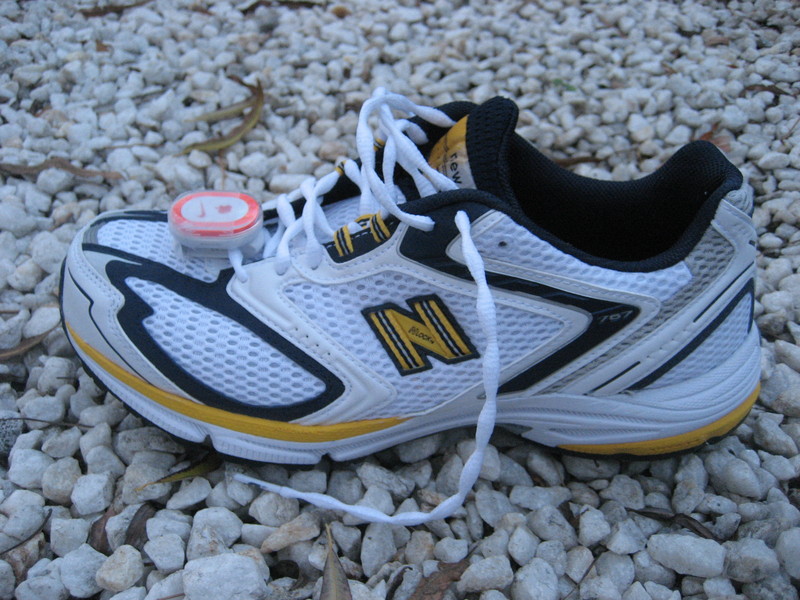
I ran a couple of hundred miles in a pair of Nike+ shoes. It is very convenient to have the sensor right in the sole of the shoe, but that is the only thing I liked about those shoes. Now I have a pair of New Balance 767's and have sewn the little sensor seated in a Switcheasy RunAway thing to the front of the shoe with the back looped through the bottom of the laces. That gets it as horizontal as possible and I find it is more accurate that way. Of course the RunAway plastic thing needs a bit of tape to make sure it doesn't swing or pop open. Here is a picture of the hack job:
I have also been playing with the run data a bit. Each run is stored in an XML file which is uploaded to the Nike site by itunes when you synch. You can easily read the files yourself by mounting the ipod and navigating to it. However, the red Nike interface you see above is a flash thing and since flash is obviously client-side the site needs some sort of API. With a little digging with Firebug it was trivial to figure out how it worked and I whipped up a little Serendipity plugin to show my stats. You can see it in the right column of this page. And I wrote a simple PHP 5 class that makes it rather easy to integrate this stuff into other apps. You can see the code here:
http://lerdorf.com/php/nikeplus.phps
Each run in the run list has an id and you can call the run() method in that class to get the raw data for that run. Graphing that gives us something like this for that same run I showed at the top:

The grey line is the raw data and the red line is a Lowess curve based on that. I find it interesting how noisy the raw data actually is. Especially for the shorter runs, but by applying a bit of local regression it cleans up nicely and data that seems accurate emerges. I can pick out the uphill stretches of my run from the graph above. If you click on the runs in the right sidebar section there you can see the graphs of my other runs.
If I could somehow find some free time I'd love to build a better tracking site than that Nike thing and then also have it support the Forerunner and whatever other devices are out there. But for now most of my free time is spent running. Probably better for me in the "long run" anyway.